Heading to WTM London? Come find us at stand S3-116. We’ve more than good coffee brewing. Pre-book a chat now!

Connected Finance Automation

Automate the operational workflows behind travel payments

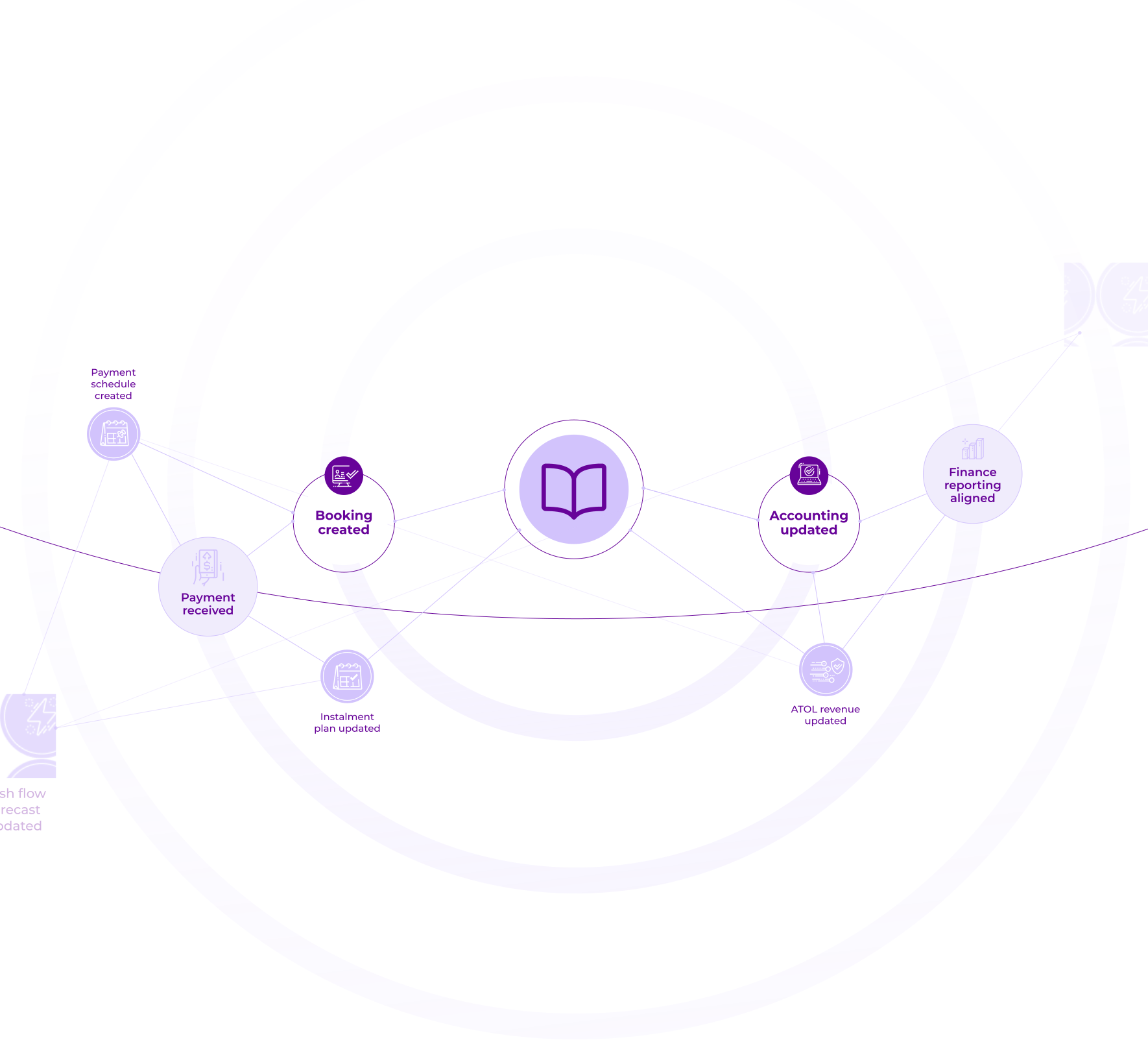
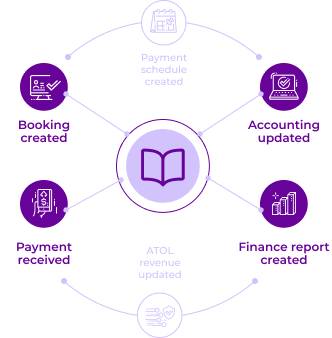
Playbooks connect your booking, payment, and finance systems —
automatically running the operational steps that normally require manual work. Instead of exporting reports, matching transactions, or updating records across systems, Playbooks run those workflows automatically in the background.
block chain image

Why travel businesses use Playbooks

White lightning bolt icon surrounded by small dots in a purple circle.

Remove manual finance workflows
Finance teams often spend hours reconciling transactions, checking booking references, and updating records across multiple systems.

Playbooks automate these operational steps so your team doesn’t need to repeat them every day.

White computer screen icon with a heart and connection nodes on a purple circular background.

Keep booking and payment data aligned
Travel businesses operate across multiple platforms — reservation systems, payment providers, accounting tools, and bank accounts.

Playbooks keep these systems aligned automatically whenever activity occurs.

White lightbulb with a lightning bolt inside on a purple circle background.

Capture operational knowledge
Many back-office processes live in spreadsheets or in the experience of one or two team members.

Playbooks turn those processes into structured workflows so the logic becomes part of the system — not dependent on individuals.

What makes Playbooks different

Most automation tools expect every workflow rule to be defined upfront.
But real travel operations rarely follow perfectly fixed processes. Playbooks are designed to evolve with your operations instead of forcing you to model everything from day one.

Purple open book icon on a lavender circular background.

Let’s say you want to automate adding payments to invoices

Start with the process
that happens most often
Think of Playbooks like training
a new member of staff. You begin by automating the standard workflow your team already follows

Vertical double-sided arrow pointing up and down between two dots.
Circular gray icon with a white lightning bolt symbol in the center.
Detect invoice update
Downward arrow icon with a short horizontal line underneath.
White icon of a British pound symbol connected by nodes on a light gray circular background.
Match invoice to booking
Downward arrow icon with a short horizontal line underneath.
Icon of a money bill with an upward arrow, symbolizing financial growth or profit.
Verify payment received

Start with the process
that happens most often
Think of Playbooks like training
a new member of staff. You begin by automating the standard workflow your team already follows

Black arrow pointing downward with two horizontal lines extending left and right from the bottom.
White checkmark symbol inside a purple circle.Illustration of two downward facing arrows connected by a bracket pointing to a horizontal arrow below.White cross mark inside a pink circular background indicating an error or close action.Downward arrow icon with a short horizontal line underneath.
Two white angled brackets facing each other inside a circular outline on a purple background.
Identify
instalment payment
Chat bubbles with dollar and euro currency symbols indicating currency exchange or global finance.
Check
currency
mismatch
White circular arrows forming a recycle symbol on a light pink background.
Check
again in

1 minute
Black outlined connector line with arrow pointing left at the top and an L-shaped bend at the bottom.

Automation improves
over time
Each time an exception is
captured, the Playbook
becomes more capable

Simple flowchart with one top box connected by dashed line to two boxes below.Simple flowchart with one top box connected by dashed line to two boxes below.
Purple circular icon with dashed white border and a vertical line insideRed circular shape with a subtle radial gradient and eight small white dashes evenly spaced around the edge.
Diagram showing two rounded rectangles connected by dashed vertical and horizontal lines with arrows pointing downward.
Calendar icon showing the number 7 with a checkmark badge in front.
Update
payments
Schedule
Icon of a globe with network nodes and three currency symbols representing global finance connections.
Convert amount using
FX rate

Workflows
evolve with
your business
Over time the automation reflects the real operational processes of your travel business — not a simplified model created
on day one

Minimalist organizational chart with one purple node at top connected to four downward arrows.
Blue circle with white icons of charts, graphs, and a dollar symbol representing financial analytics.
Structure transaction data for reporting
Icon showing a market analysis with a bar chart and a speech bubble containing a check mark inside a purple circle.
Forecast upcoming supplier payments
Icon of a glass with a straw and a chart with an upward trend line.
Track trust account balance
Chat bubbles with dollar and euro currency symbols indicating currency exchange or global finance.
Allocate funds to escrow account
Timeline showing campaign progress with 46.6% donations reached on March 14, progressing towards $20,000 goal by April 28.
White checkmark symbol inside a purple circle.

Automation now
handles it automatically

Example Playbooks

Playbooks can automate many of the operational workflows travel finance teams currently manage manually.

Bank payment identification

Using felloh’s AISP bank connectivity, Playbooks can monitor incoming payments to your bank account.

When a payment arrives, the Playbook can:

Gray circular badge with the number one and a downward arrow beneath it.

New bank payment detected

A large gray circle with the number 2 in black at its center and an arrow extending downward from its bottom.

Check booking reference pattern

Circular label with the number three inside and a line pointing downward.

Identify likely booking match

Black check mark inside a gray circle.

Notify sales team or update booking system

This removes the need for teams to manually review bank activity throughout the day.

Regulatory reporting processes

Playbooks can also automate structured operational processes such as:

  • ATOL renewals
  • ABTA renewals
  • bonding calculations
  • trust account reporting

For example:

Gray circular badge with the number one and a downward arrow beneath it.

Collect booking data

A large gray circle with the number 2 in black at its center and an arrow extending downward from its bottom.

Calculate passenger revenue totals

Circular label with the number three inside and a line pointing downward.

Pull trust account balances

Black check mark inside a gray circle.

Generate reporting summaries

If the steps and required data can be defined, a Playbook can automate much of the preparation work.

Consortium

bulk payment reconciliation

Tour operators working with travel consortia often receive bulk payments covering multiple bookings.

Playbooks can automatically process remittance data from groups such as:

  • Hays Travel Independence Group
  • Global Travel Group
  • The Co-operative Travel Consortium
  • Advantage Travel Partnership
Gray circular badge with the number one and a downward arrow beneath it.

Bulk payment received

A large gray circle with the number 2 in black at its center and an arrow extending downward from its bottom.

Import remittance data

Circular label with the number three inside and a line pointing downward.

Break payment into individual bookings

Black arrow pointing downward below a white circle with the number 4 in black.

Match bookings to internal records

Black check mark inside a gray circle.

Update finance systems

This allows operators to reconcile consortium payments without manual spreadsheet matching.

Built for

travel operations

Generic automation platforms rarely understand the structure of travel transactions.

Playbooks are designed specifically for travel finance workflows, including:

check icon

Booking references and passenger records

check icon

Staged or instalment payments

check icon

Reconciliation across multiple payment channels

check icon

Remittance files from travel consortia

check icon

Trust and escrow account monitoring

flash icon

Because Playbooks run inside the felloh platform,  they remain connected to the booking and payment data your business already manages.

start quotes icon

“Playbooks allow finance teams to gradually capture operational edge cases over time.
As more scenarios are automated, the efficiencies compound —

freeing teams from reactive tasks and reducing reliance on undocumented processes.”

Customer

end quote

Automate the workflows
behind your travel operations

See how Playbooks can simplify finance operations across your
booking, payment, and reporting systems.

Book a demo

Connected

Finance Automation

Infographic-hero mobile

Automate the operational workflows
behind travel payments

Playbooks connect your booking, payment, and finance systems — automatically running the operational steps that normally require manual work. Instead of exporting reports, matching transactions, or updating records across systems, Playbooks run those workflows automatically in the background.

Book a demo

Why travel businesses
use Playbooks

Purple lightning bolt with electrical sparks representing isolation mode.
Remove manual finance
workflows

Finance teams often spend hours reconciling transactions, checking booking references, and updating records across multiple systems.
Playbooks automate these operational steps so your team doesn’t need to repeat them every day.

Icon of a smart speaker surrounded by connected smart home device icons.
Keep booking and payment
data aligned

Travel businesses operate across multiple platforms — reservation systems, payment providers, accounting tools, and bank accounts.
Playbooks keep these systems aligned automatically whenever activity occurs.

Purple light bulb icon with a lightning bolt inside, representing an idea or energy.
Capture operational knowledge

Many back-office processes live in spreadsheets or in the experience of one or two team members.
Playbooks turn those processes into structured workflows so the logic becomes part of the system — not dependent on individuals.

White book icon with open pages on a purple circular background.

What makes

Playbooks different

Most automation tools expect every workflow rule to be defined upfront.
But real travel operations rarely follow perfectly fixed processes. Playbooks are designed to evolve with your operations instead of forcing you to model everything from day one.

Let’s say you want to automate adding payments to invoices

Start with the process
that happens most often
Think of Playbooks like training
a new member of staff. You begin by automating the standard workflow your team already follows

Illustration of a person wearing a cape in isolation mode with virus icons around, signifying health protection.
Detect invoice update
Downward arrow icon with a short horizontal line underneath.
Icon of six connected circles arranged in an arc forming a network.
Match invoice to booking
Downward arrow icon with a short horizontal line underneath.
Icon of an open laptop displaying a cursor arrow and a browser window with tabs.
Verify payment received
White checkmark symbol inside a purple circle.Illustration of two downward facing arrows connected by a bracket pointing to a horizontal arrow below.White cross mark inside a pink circular background indicating an error or close action.Downward arrow icon with a short horizontal line underneath.

Capture exceptions as they appear
When an unusual scenario occurs,
your team defines how it should be
handled next time

Blue circular icon with a white arrow pointing clockwise indicating refresh or reload.
Identify
instalment payment
Icon of a hand holding a document with a checkmark on it, symbolizing approval or verification.
Check
currency
mismatch
Circular arrow rotating clockwise around a clock face.
Check
again in

1 minute
Purple circular icon with dashed white border and a vertical line insideRed circular shape with a subtle radial gradient and eight small white dashes evenly spaced around the edge.

Automation improves over time
Each time an exception is captured, the Playbook becomes more capable

Blue icon of a chef's hat with a small spoon and fork crossing inside it.
Update
payments
Schedule
Cartoon robot with a smiling face and big eyes on a teal background.
Convert amount using
FX rate

Workflows evolve with your business
Over time the automation reflects the real operational processes of your travel business — not a simplified model created on day one

Flowchart with one top node connected by a line to four downward arrows.
Colorful gear icons in blue, orange, green, yellow, and red arranged in a cluster.
Structure transaction data for reporting
Green cellulose fibers scattered on a white background.
Forecast upcoming supplier payments
Icon of a framed landscape picture with mountains and a sun on a wall.
Track trust account balance
Icon of a hand holding a document with a checkmark on it, symbolizing approval or verification.
Allocate funds to escrow account
Timeline showing campaign progress with 46.6% donations reached on March 14, progressing towards $20,000 goal by April 28.
White checkmark symbol inside a purple circle.

Automation now
handles it automatically

Example Playbooks

Playbooks can automate many of the operational workflows travel finance teams currently manage manually.

Bank payment identification

Using felloh’s AISP bank connectivity, Playbooks can monitor incoming payments to your bank account.

When a payment arrives, the Playbook can:

Gray circular badge with the number one and a downward arrow beneath it.

New bank payment detected

A large gray circle with the number 2 in black at its center and an arrow extending downward from its bottom.

Check booking reference pattern

Circular label with the number three inside and a line pointing downward.

Identify likely booking match

Black check mark inside a gray circle.

Notify sales team or update booking system

This removes the need for teams to manually review bank activity throughout the day.

Regulatory reporting processes

Playbooks can also automate structured operational processes such as:

  • ATOL renewals
  • ABTA renewals
  • bonding calculations
  • trust account reporting

For example:

Gray circular badge with the number one and a downward arrow beneath it.

Collect booking data

A large gray circle with the number 2 in black at its center and an arrow extending downward from its bottom.

Calculate passenger revenue totals

Circular label with the number three inside and a line pointing downward.

Pull trust account balances

Black check mark inside a gray circle.

Generate reporting summaries

If the steps and required data can be defined, a Playbook can automate much of the preparation work.

Consortium

bulk payment reconciliation

Tour operators working with travel consortia often receive bulk payments covering multiple bookings.

Playbooks can automatically process remittance data from groups such as:

  • Hays Travel Independence Group
  • Global Travel Group
  • The Co-operative Travel Consortium
  • Advantage Travel Partnership
Gray circular badge with the number one and a downward arrow beneath it.

Bulk payment received

A large gray circle with the number 2 in black at its center and an arrow extending downward from its bottom.

Import remittance data

Circular label with the number three inside and a line pointing downward.

Break payment into individual bookings

Black arrow pointing downward below a white circle with the number 4 in black.

Match bookings to internal records

Black check mark inside a gray circle.

Update finance systems

This allows operators to reconcile consortium payments without manual spreadsheet matching.

Built fortravel operations

Generic automation platforms rarely understand the structure of travel transactions.

Playbooks are designed specifically for travel finance workflows, including:

check icon

Booking references and passenger records

check icon

Staged or instalment payments

check icon

Reconciliation across multiple payment channels

check icon

Remittance files from travel consortia

check icon

Trust and escrow account monitoring

flash icon

Because Playbooks run inside the felloh platform,  they remain connected to the booking and payment data your business already manages.

start quotes

“Playbooks allow finance teams to gradually capture operational edge cases over time.
As more scenarios are automated, the efficiencies compound —

freeing teams from reactive tasks and reducing reliance on undocumented processes.”

Customer

end quote

Automate the workflows
behind your
travel operations

See how Playbooks can simplify finance operations across your booking, payment, and reporting systems.
Book a demo